CCNA Home Lab!!! (With Video Part 2) (Posted Nov 8, 2023)
VIDEO – https://www.youtube.com/watch?v=8eIbtfgsr6s
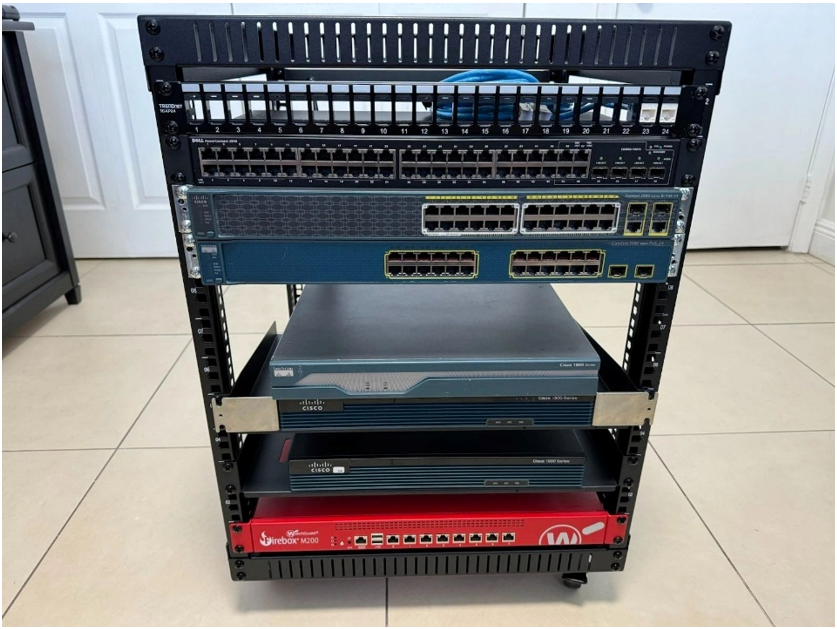
All my equipment has arrived save for a few wings for the routers. I have waited to start plugging things in until everything is assembled. You will see I begin turning on the equipment here in this video.
I added another power strip after considering the joule count for possible power issues due to not having a UPS for this set up. The first strip I had mounted already had 300 Joules, which I kept on the rack for a secondary power source for hosts.
EQUIPMENT LIST
1. Rack – RIVECO 12U Server Rack Open Frame (19 inch).(LINK)
2. Patch Panel – TRENDnet TC-KP24, 24Port 1U Patch Panel 19″ (LINK)
3. Switch (Layer 2) – Dell Power Connect 2848
4. Switch (Layer 2) – Cisco 2960 Series SI PoE-24 (Layer 2)
5. Switch (Layer 3) – Cisco Catalyest 3560 SI PoE-24
6. Router (1) – Cisco 1800 Series (Given from my friend Adonis)
7. Router (2) – Cisco 1900 Series
8. Router (3) – Cisco 1900 Series
9. Firewall – Watchguard Firebox M200
10. Shelves – MT-VIKI 1U 10 inch deep(LINK)
11. Power Strip – BTU 1U Rack, 8 outlets, 300 Joules (LINK)
12. Power Strip – UltraPoE 1U Rack 1800 Joules(LINK)


You May Also Like
CCNA HOME LAB!!!! (With Video) (Posted Oct 25, 2023)
Network Upgrade with Ubiquiti!!! (Video) (Posted Aug 16, 2024)